
Overview
The Demurrage & Detention Reminder feature in GoFreight helps users avoid unnecessary charges by reminding them to:
- Pick up containers before the Last Free Day (LFD) to avoid demurrage charges.
- Return empty containers within the allowed free detention days to avoid detention charges.
Disclaimer: Please note that detention days mentioned above are calculated based on common rules starting from the unload/outgate time. For exact rules, please do verify with therespective shipping company.
Reminders are available through the following channels:
1. Demurrage Reminder
The Demurrage Reminder helps users track containers that need to be picked up and identify containers that may have incurred demurrage charges.
1.1 My Containers View
In My Containers, there are two reminder tabs: Containers to Pickup and Overdue Containers.
1.1.1 Containers to Pickup
This tab helps users identify containers that need to be picked up to avoid potential demurrage charges.
To accommodate shipments with different Last Free Days (LFDs), containers appear in this tab once they meet the system criteria for being discharged and awaiting pickup.
System Definition — Containers to Pickup
Containers must meet the following criteria:
- ETA is within the last 60 days.
- Container status is Incomplete.
- No Outgate Date has been recorded.
Additionally, containers must meet one of the following conditions:
- Non-rail shipments:
- The container has been unloaded from the vessel; or
- The container has been at the port for 4 or more days without an Outgate Date.
- Rail shipments:
- The container has been at the destination rail terminal (DEL) for 2 or more days.
1.1.2 Overdue Containers
This tab displays containers that have passed their Last Free Day (LFD) and may have incurred demurrage charges because they have not been picked up.
System Definition — Overdue Containers
Containers must meet all of the following criteria:
- ETA is within the last 60 days.
- No Empty Return has been recorded.
- Container stage is Incomplete.
- The LFD has passed.
- No Outgate Date has been recorded.
Note: To manually mark a container as picked up, enter the Outgate Date or mark the container as complete.
1.2 Demurrage Reminder Email Notification
Email Subject:
[COMPANY NAME][Alert][OP] Potential Demurrage Reminder - FCL Containers
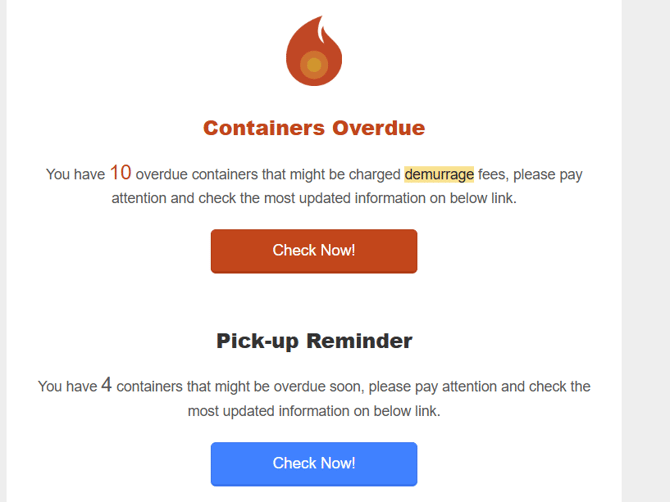
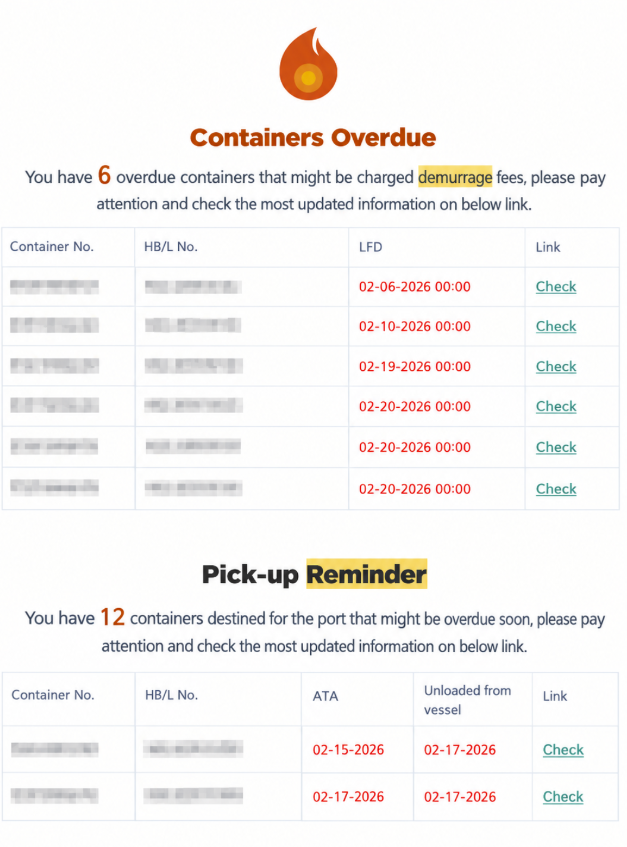
The email notification contains two sections:
- Containers Overdue (Past LFD): Containers that have passed their LFD.
- Pick-up Reminder (Containers to be Picked Up): Containers that need to be picked up.
The same system criteria used in the My Containers view apply to the email notifications.
2. Detention Reminder (Container Return Reminder)
The Detention Reminder helps users return empty containers before exceeding the allowed free detention days and incurring additional charges.
Detention reminders are sent via email and are triggered based on the container's Outgate Date, configured Free Detention Days (FDD), and Detention Reminder Look-Ahead Days.
2.1 Detention Free Days Configuration
To accommodate different detention policies across carriers, GoFreight supports configuring detention free days separately for dry and reefer containers.
Default Free Detention Days (FDD)
If no carrier-specific configuration is set, the system uses the following default values:
- Dry containers: 4 days from outgate
- Reefer containers: 2 days from outgate
Carrier-Specific Configuration
Users can configure a standardized number of detention free days for each carrier, with separate settings for dry and reefer containers.
- If a carrier has a specific detention configuration, the system uses the configured values for that carrier's shipments.
- If a carrier has no specific configuration, the system continues to use the default FDD settings.
Example:
If Carrier A is configured with 5 detention days for dry containers and 3 days for reefer containers, the system applies these settings to Carrier A's shipments. Shipments handled by other carriers without specific configurations will continue to follow the default settings of 4 days for dry containers and 2 days for reefer containers.
⚙ Detention free days can be configured
To configure or adjust carrier-specific detention days for your company, please contact GoFreight Support and provide the carrier’s Trade Partner Code (TP Code) in your GoFreight system. .
2.2 Detention Reminder Look-Ahead Days
The Detention Reminder Look-Ahead Days setting determines how many days before the detention deadline the system starts sending container return reminders.
- Default setting: 7 days
- Customizable: Yes, based on your company's needs
Example:
With a look-ahead setting of 7 days, the system starts sending detention reminders 7 days before the applicable detention deadline, giving your team time to arrange empty container returns and avoid potential detention charges.
⚙ Look-Ahead Days days can be configured.
To adjust the look-ahead days for your company, please contact GoFreight Support.
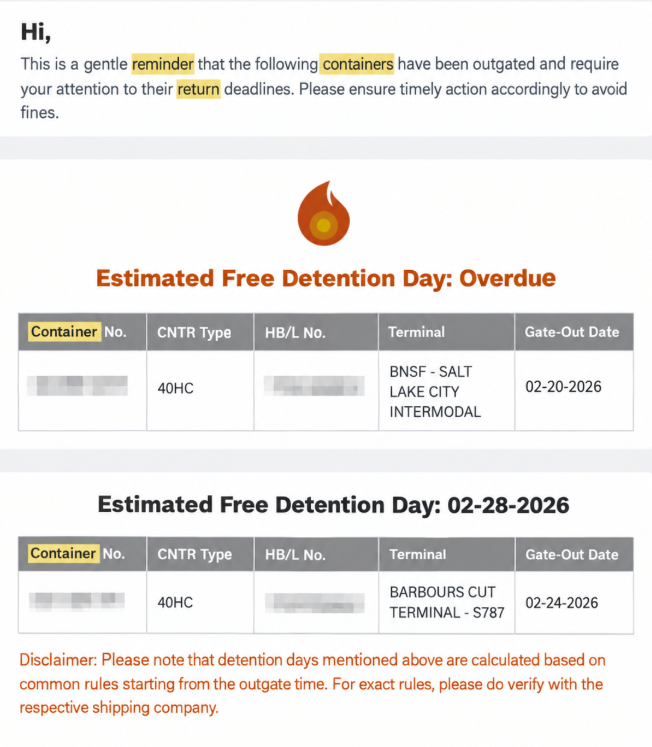
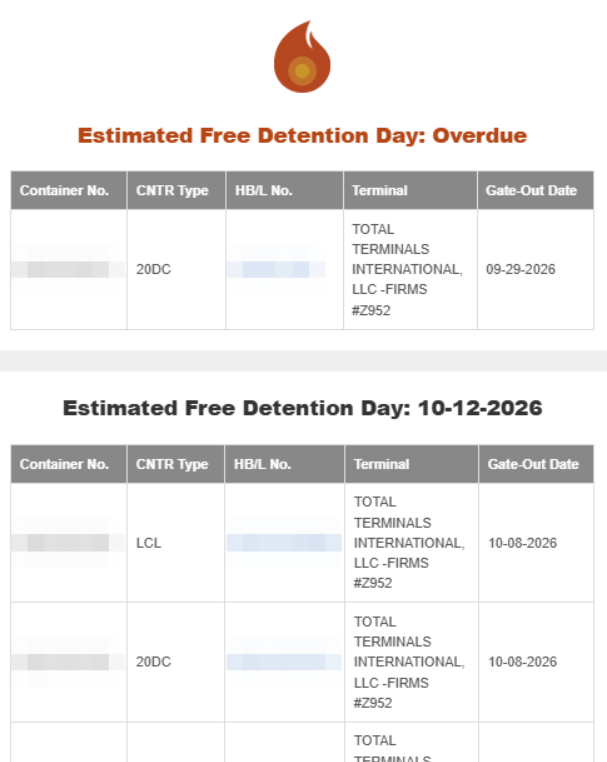
2.3 Detention Reminder Email Notification
Email Subject:
[COMPANY NAME]Container Return Reminder
The email notification reminds users to return empty containers before exceeding the allowed free detention days. Reminders are generated based on the configured detention free days and reminder look-ahead period.
3. How to Enable Reminders
3.1 Enable Reminders for OP (Internal Users)
To enable Demurrage and Detention Reminder notifications:
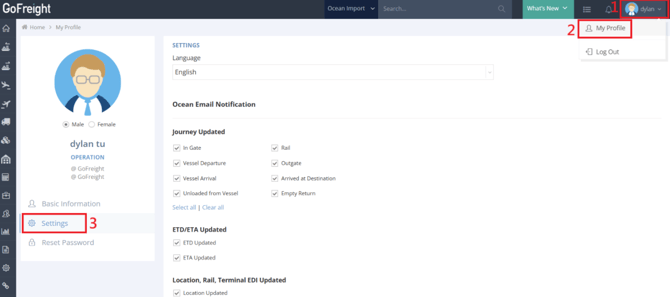
- Log in to GoFreight.
- Click your name in the top-right corner.
- Select My Profile.
- Go to Settings.
- Scroll down to Periodic Reports.
- Check the following options:
- Demurrage Reminder
- Container Return Reminder
- Click Save Changes.
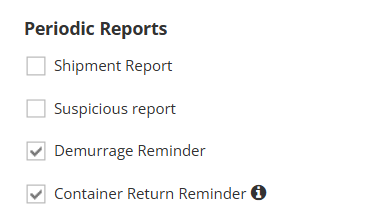
Once enabled, the selected reminders will be sent according to the applicable system rules and notification settings.
3.2 Enable Reminders for Tracking Users (Customer Portal Users)
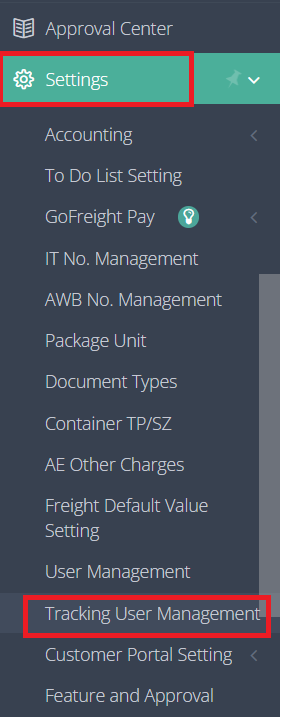
To enable reminder notifications for a Tracking User:
- Go to Settings.
- Select Tracking User Management.
- Select the desired Tracking User.
- Open the Notification tab.
- Scroll down to Periodic Reports.
- Enable the following options as needed:
- Demurrage Reminder
- Container Return Reminder
- Click Save.
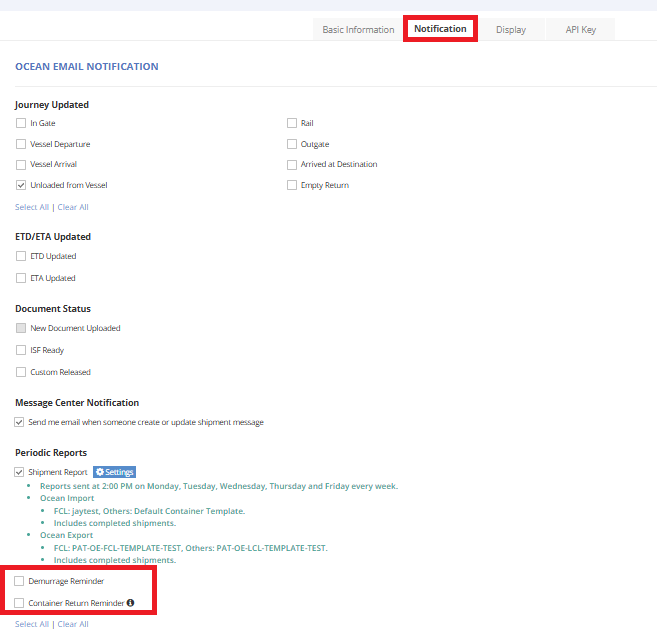
Note: If the Demurrage Reminder or Container Return Reminder options are not available in the Tracking User settings, please contact GoFreight Support to enable these features for Tracking Users.
3.3 Reminder Email Preview (Customer Portal Users)
Email Subject:
[COMPANY NAME][Alert] Potential Demurrage Reminder - FCL Containers
Email Subject: [COMPANY NAME] Container Return Reminder
You might also be interested in:
- Setting Up Tracking Email Notifications for Trade Partners
- How to Manage Your Shipment Tracking Email Notifications
- How to get your trade partners to use the Tracking Portal?