
Before We Start
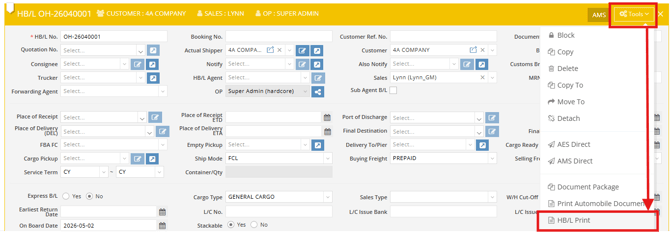
In GoFreight, both the Ocean Export and Ocean Import modules allow users to generate and print a House Bill of Lading (HBL) from the House level Tools menu.
- Ocean Export Module
- Ocean Import Module
Please refer to this article for detailed instructions: How to Print HBL in the Ocean Import Module
BL Clauses Setup
GoFreight provides a default version of BL Clauses (Bill of Lading Clauses).
If you would like to use your own version, please email the GoFreight Support Team at support@gofreight.com with your Word or PDF file. We will update it in the backend for you.
Note: We recommend keeping the content within one page to avoid generating multi-page BL Clauses during printing.
How to Include BL Clauses in HBL
- Go to the HBL level in either the Ocean Export or Ocean Import shipment file.
- Click Tools → HBL Print in the top-right menu.
- In the print preview screen, check the box “Include BL Clause” (located at the top-right).
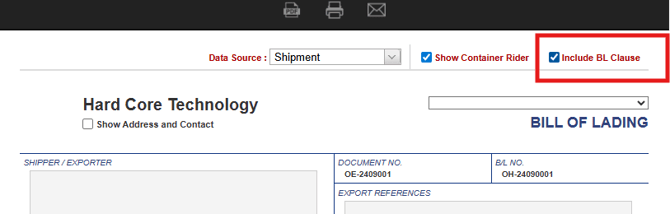
- Choose your output method: PDF / Print / Email.
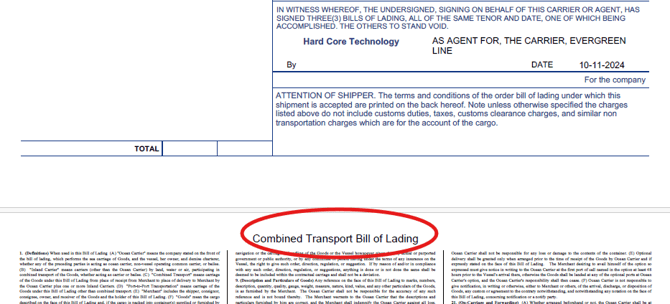
Once completed, you will see the BL Clauses included as the second page of the HBL document.
You might also be interested in:
- How to Print HBL in the Ocean Import Module
- Ocean Export – Batch Generation of HBL, Booking Confirmation, and Pickup/Delivery Orders
- How to Generate Shipping Instructions for Ocean Export