
GoFreight provides the capability to generate the Singapore GST Report ( Goods and Services Tax Report).
Note: This report is exclusively for Singaporean companies.
**The GST Report is disabled by default. To enable it, please contact support@gofreight.com.**
To generate the Singapore GST Report, please follow the steps below:
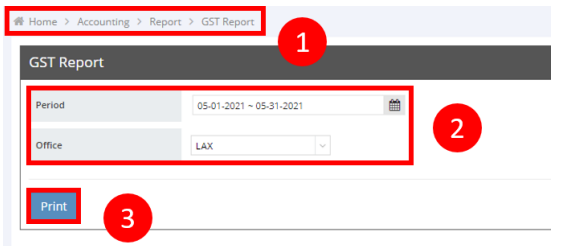
- Navigate to "Accounting" > "Report" > "GST Report" in the left side navigation bar.
- Select the desired Period and Office.
- Click the "Print" button.
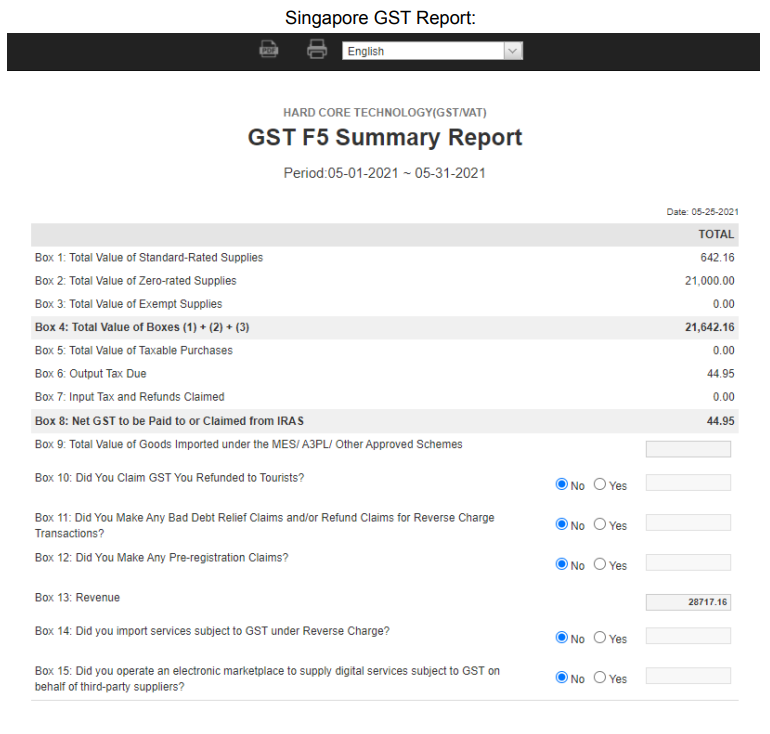
Below is a sample of the Singapore GST Report:
You might also be interested in:
- Multi-Tax User Guide: Streamlining Tax Calculations
- How to Generate a Revenue/Cost Report?
- How to Generate an Income Statement in GoFreight?