
If a customer pays for multiple shipments in one transaction, you can apply that payment across several statements. Likewise, if you receive multiple local invoices from the same agent for different shipments within the same month, and you want to settle them all at once, you can use multiple statements to make a single payment.
You can make or receive payments using multiple statements in the agent/local statement. Please follow the steps below:
- Navigate to "Accounting" > "Report" > "Agent/Local Statement".
- Select the statements associated with the same partner for which you want to make or receive a payment. Then, click “Make/Receive Payment”.
Note: Only statements with confirmed amounts can be selected.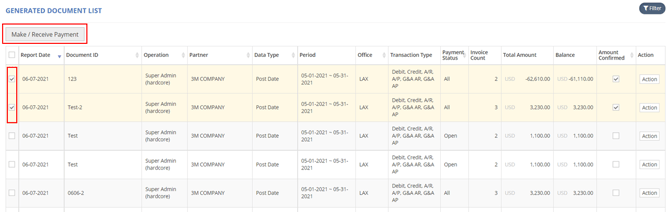
- Enter the Pay Amount and click “OK”.
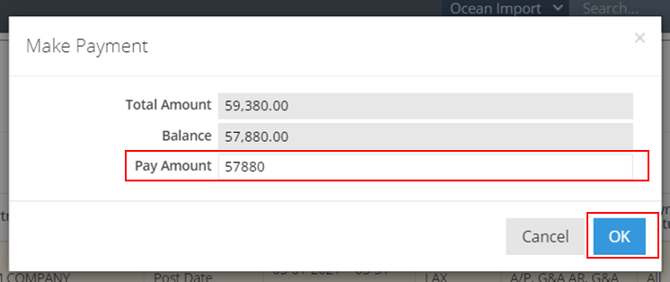
- You will be redirected to the payment page.
- Follow the steps outlined in the corresponding articles to complete your payment:
-
- How to Make a Payment (Full Paid, Partial Paid)? for making a payment.
- How to Receive a Payment (Full Receive or Partial Receive)? for receiving a payment.
You might also be interested in:
- How to Generate the Agent/Local Statement?
- How to Receive a Payment (Full Receive or Partial Receive) ?
- How to Make a Payment (Full Paid, Partial Paid)?