
Follow these steps to print an AR (Accounts Receivable) invoice:
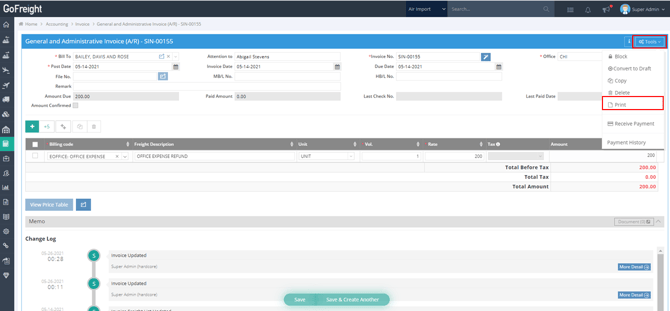
- Locate an AR Invoice that you would like to print.
- Click on “Tools” > “Print” located in the upper right corner of the invoice page.
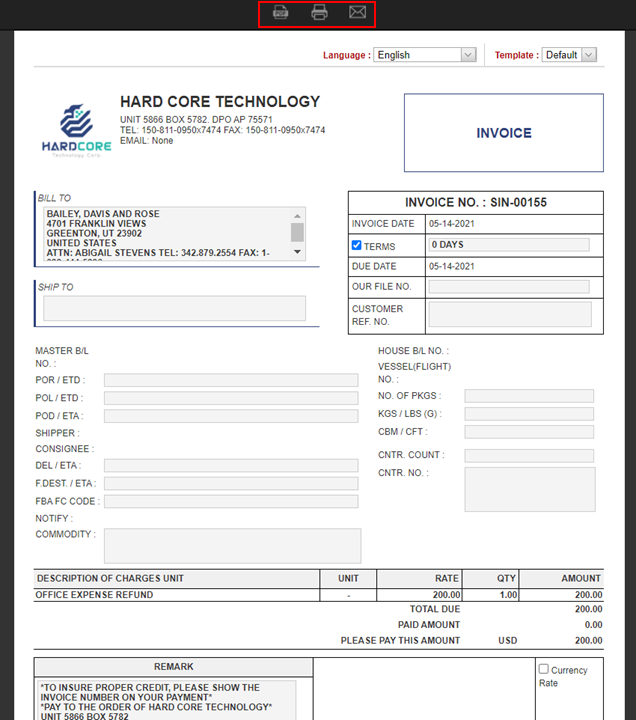
- Choose one of the following options at the top of the page:
- “Download PDF”
- “Print PDF”
- “Email”
You might also be interested in:
- What is Post Invoice, and How does it work?
- How to Set Up a French or Mandarin Remark on AR Invoices
- Configuring Invoice Remarks in Bank List