
Background
To maintain authorization to send documents through GoFreight, users must re-verify their email accounts every 3 months, including new users. This requirement is enforced by both Google and Microsoft.
This article applies to users who are using Microsoft as their email service provider.
Issue Description
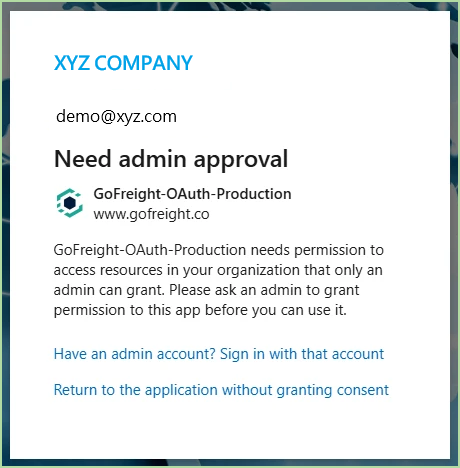
Some users may see a “Need admin approval” message when setting up email in GoFreight.
Please note that this message is generated by your company’s Microsoft 365 security policy, not by GoFreight.
Microsoft requires your IT administrator to pre-approve third-party applications that send emails on behalf of users. This is a one-time setup.
What You Need to Do
Please forward the instructions below to your IT administrator (or the person managing your Microsoft 365 environment).
Instructions for IT Administrator
Step 1: Verify Global Administrator Access
Open the following link and sign in with a work account: Click here
After signing in, you will see one of the following:
- Consent page for GoFreight-OAuth-Production with “Accept / Cancel” → You have Global Admin access. Proceed to Step 2.
- “Need admin approval” or permission denied message → You do not have Global Admin access. Please contact another administrator.
Step 2: Review and Grant Consent
On the consent page, please verify the following details:
- App Name: GoFreight-OAuth-Production
- Publisher: www.gofreight.co
- Application (Client) ID: 043f9863-69cf-4fab-8c98-fe311725e7d9
Requested Permissions:
- Read and write access to the user’s mail
- Send mail as a user
- Sign in and read the user profile
Purpose:
Allows GoFreight to send invoices and shipment documents on behalf of users.
After verification, click Accept.
Step 3: Completion
After clicking Accept, the page will redirect automatically.
From this point on, users in your organization will be able to configure email in GoFreight without seeing the “Need admin approval” message.
Microsoft Official Reference
Microsoft Learn – Microsoft Entra ID Admin Consent Guide
You might also be interested in:
- How to Set Up Your GoFreight Account Email Address?
- How to Whitelist the GoFreight Domain in Your Email Server?
- [FAQ] What to do when your customer/vendor can not receive email from GoFreight or open GoFreight's PDF documents.