
If your business needs to share profits with your overseas agent, follow the steps below to execute profit sharing using debit/credit notes.
Navigate to "Accounting" > "Invoice/Cost" > "Invoice/Cost List." Once you're in the list, locate the specific debit or credit note for which you want to share profits.
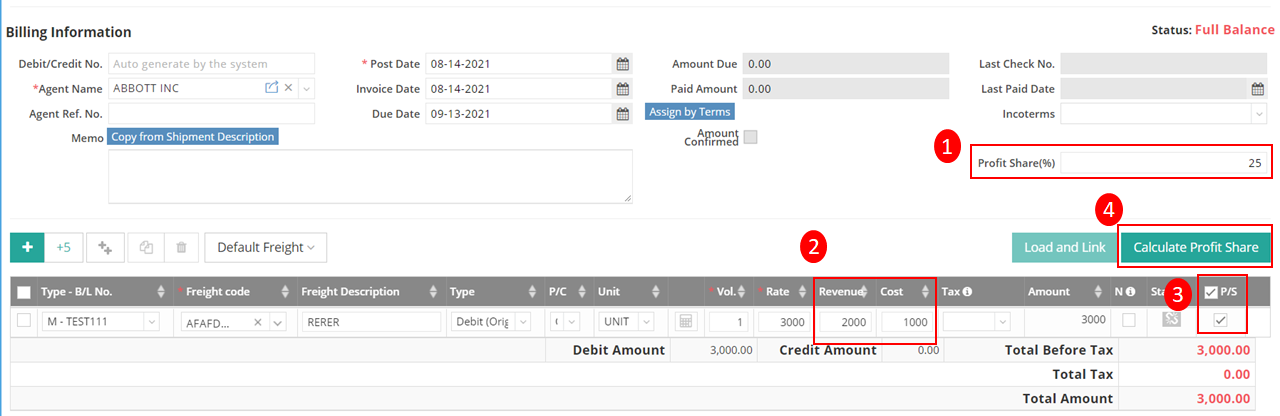
- If necessary, manually set the profit share percentage. Note: The default profit share is set to 50%. If you need to adjust this percentage, please contact us at support@gofreight.com.
- Enter the amount of revenue and cost. Note: The revenue and cost amounts are unrelated to the total amount. They are solely used to calculate the profit share.
- Check the “P/S” box next to the status.
- Click on “Calculate Profit Share.”
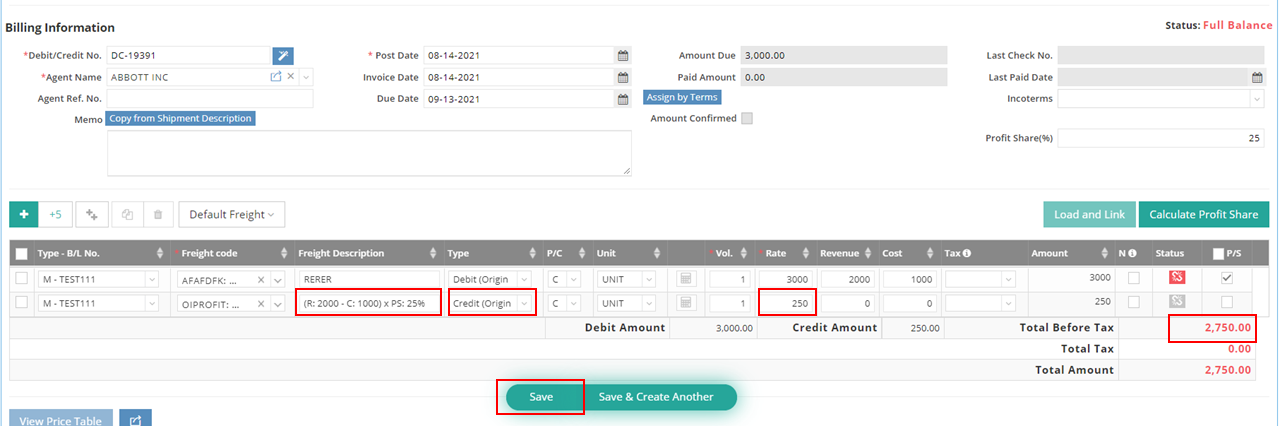
A new line for profit sharing will appear. For example: (Revenue: $2000 - Cost: $1000) x Profit Share: 25% = $250. This means you are sharing 25% of the profit with your agent, resulting in a credit of $250. The total amount will be $2750. (Total Revenue: $3000 - $250 Credit)
You might also be interested in:
- How does the Load and Link/Match work?
- How to Generate the Agent/Local Statement?
- How to Make or Receive Payment with Multiple Statements in Agent/Local Statement?