
When invoices are uncollectible, they are written off as bad debts.
To write off invoices as bad debts in the system, please follow the steps below:
Note: By default, this function to receive payment is only available for the role of General Manager, Accounting Manager, and Accounting.
1. Navigate to "Accounting" > "Payment" > "Receive Payment" on the navigation bar. 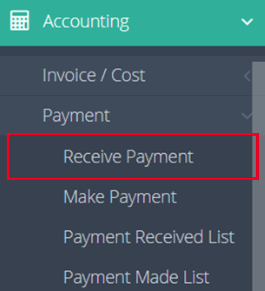
2. Enter the name of the customer in the "Received From" field.
3. Click "Search" in the “Invoice Search” section. 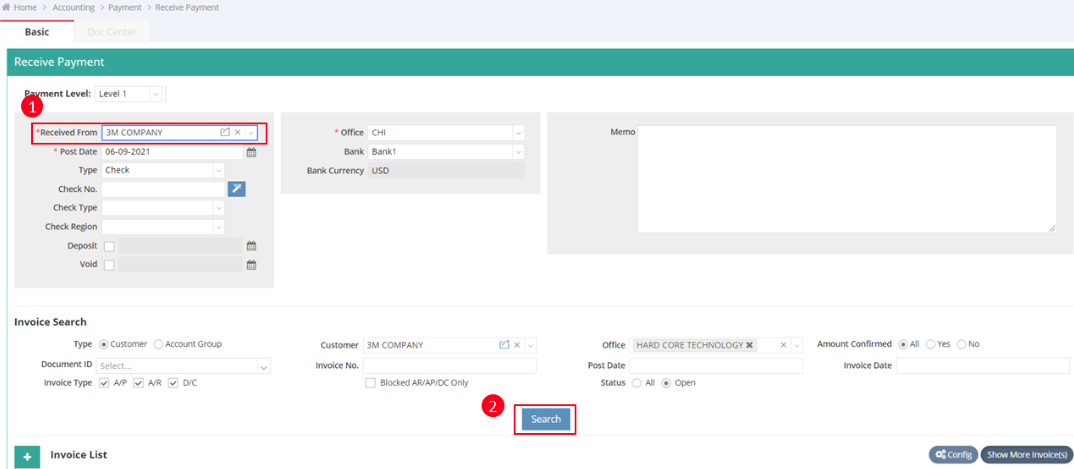
4. Once invoices are listed under this customer, check the invoices classified as bad debts ( For example, we select two invoices for $150 each).
5. Click the green "+" button to add a new line under the Invoice List, then enter 50140 BAD DEBTS EXPENSES in the General Ledger (G/L) field.
6. Enter a negative amount in the Payment field of Bad Debts Expense ( in this example, enter $-300 for the 2 selected invoices).
7. Click "Save" to complete the process.

You might also be interested in:
- How to Receive a Payment (Full Receive or Partial Receive) ?
- How to Search in the Aging Report?
- How to Generate a General Ledger Report in GoFreight?